
- MFC - Home
- MFC - Overview
- MFC - Environment Setup
- MFC - VC++ Projects
- MFC - Getting Started
- MFC - Windows Fundamentals
- MFC - Dialog Boxes
- MFC - Windows Resources
- MFC - Property Sheets
- MFC - Windows Layout
- MFC - Controls Management
- MFC - Windows Controls
- MFC - Messages & Events
- MFC - Activex Controls
- MFC - File System
- MFC - Standard I/O
- MFC - Document View
- MFC - Strings
- MFC - Carray
- MFC - Linked Lists
- MFC - Database Classes
- MFC - Serialization
- MFC - Multithreading
- MFC - Internet Programming
- MFC - GDI
- MFC - Libraries
MFC - Combo Boxes
A combo box consists of a list box combined with either a static control or edit control. it is represented by CComboBox class. The list-box portion of the control may be displayed at all times or may only drop down when the user selects the drop-down arrow next to the control.
Here is the list of messages mapping for Combobox control −
| Message | Map entry | Description |
|---|---|---|
| CBN_DBLCLK | ON_CBN_DBLCLK( <id>, <memberFxn> ) | The user double-clicks a string in the list box of a combo box. |
| CBN_DROPDOWN | ON_CBN_DROPDOWN( <id>, <memberFxn> ) | The list box of a combo box is about to drop down (be made visible). |
| CBN_EDITCHANGE | ON_CBN_EDITCHANGE( <id>, <memberFxn> ) | The user has taken an action that may have altered the text in the editcontrol portion of a combo box. |
| CBN_EDITUPDATE | ON_CBN_EDITUPDATE( <id>, <memberFxn> ) | The edit-control portion of a combo box is about to display altered text. |
| CBN_KILLFOCUS | ON_CBN_KILLFOCUS( <id>, <memberFxn> ) | The combo box is losing the input focus. |
| CBN_SELCHANGE | ON_CBN_SELCHANGE( <id>, <memberFxn> ) | The selection in the list box of a combo box is about to be changed as a result of the user either clicking in the list box or changing the selection by using the arrow keys. |
| CBN_SETFOCUS | ON_CBN_SETFOCUS( <id>, <memberFxn> ) | The combo box receives the input focus. |
Let us look into an example of Radio button by creating a new MFC dialog based application.
Step 1 − Drag a Combo box and remove the Caption of Static Text control.
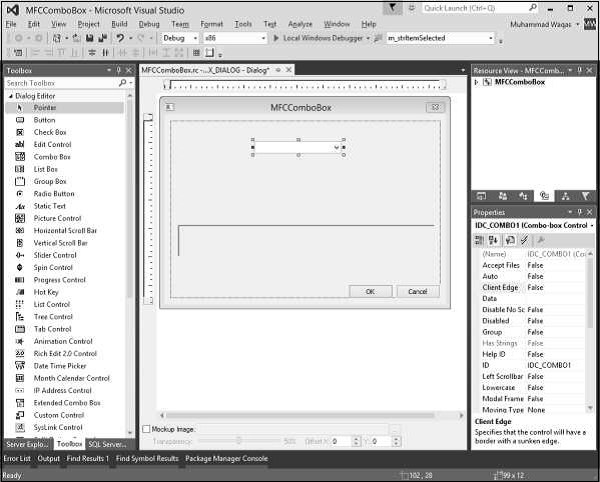
Step 2 − Add a control variable m_comboBoxCtrl for combobox and value variable m_strTextCtrl for Static Text control.
Step 3 − Add event handler for selection change of combo box.
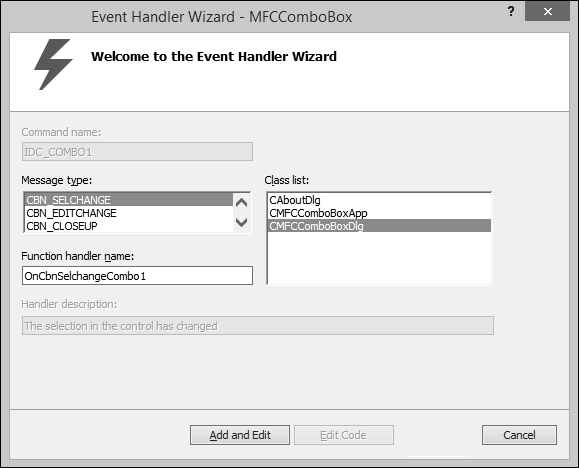
Step 4 − Add the following code in OnInitDialog() to load the combo box.
for (int i = 0; i<10; i++) {
   str.Format(_T("Item %d"), i);
   m_comboBoxCtrl.AddString(str);
}
Step 5 − Here is the implementation of event handler.
void CMFCComboBoxDlg::OnCbnSelchangeCombo1() {

   // TODO: Add your control notification handler code here
   m_comboBoxCtrl.GetLBText(m_comboBoxCtrl.GetCurSel(), m_strTextCtrl);
   UpdateData(FALSE);
}
Step 6 − When the above code is compiled and executed, you will see the following output.
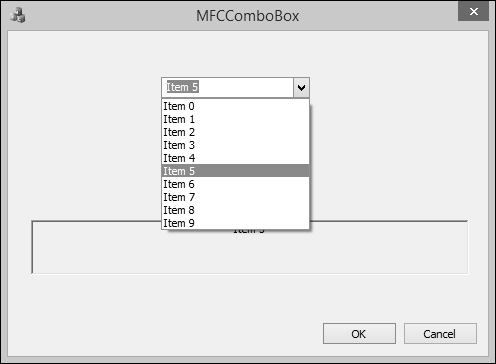
Step 7 − When you select any item then it will be displayed on the Text Control.
